Dashboard
What is the dashboard?
Section titled “What is the dashboard?”The dashboard is the screen you land on after signing in: the answer to “where am I?”, and the one to come back to when you want the state of your money in a few seconds rather than a few minutes.
It leads with Safe to Spend, then shows a set of cards that each open the screen behind them. Nothing on the dashboard is edited in place: a card is a summary and a way in.
Why is the dashboard different on each device?
Section titled “Why is the dashboard different on each device?”Tovari runs in three places, and each of them shows a different set of cards — chosen for the room available and for what you are likely to want there. A PC or Mac has space for the long view; a phone leads with what you can act on now.
That means this page is not a single list of cards with different layouts. Read the tab for the place you are actually using, and the platform map if you want to compare them side by side.
Where do dashboard figures come from?
Section titled “Where do dashboard figures come from?”Every dashboard figure is calculated by Tovari, never by the screen showing it. Safe to Spend, your balances, your net worth, your budget totals and your spending breakdowns are all sent to the app, which draws them.
Two consequences:
- The surfaces cannot disagree. The same figure on a PC or Mac, a phone browser and the mobile app is the same figure, not three independent sums that happen to line up.
- A figure only changes when your data does. If a number looks wrong, the answer is in the underlying transactions, accounts or bills — not in the card.
Numbers that are still loading, or that could not be loaded, are shown as such rather than as a zero. A dash means “not known yet”, never “nothing”.
The top of the screen
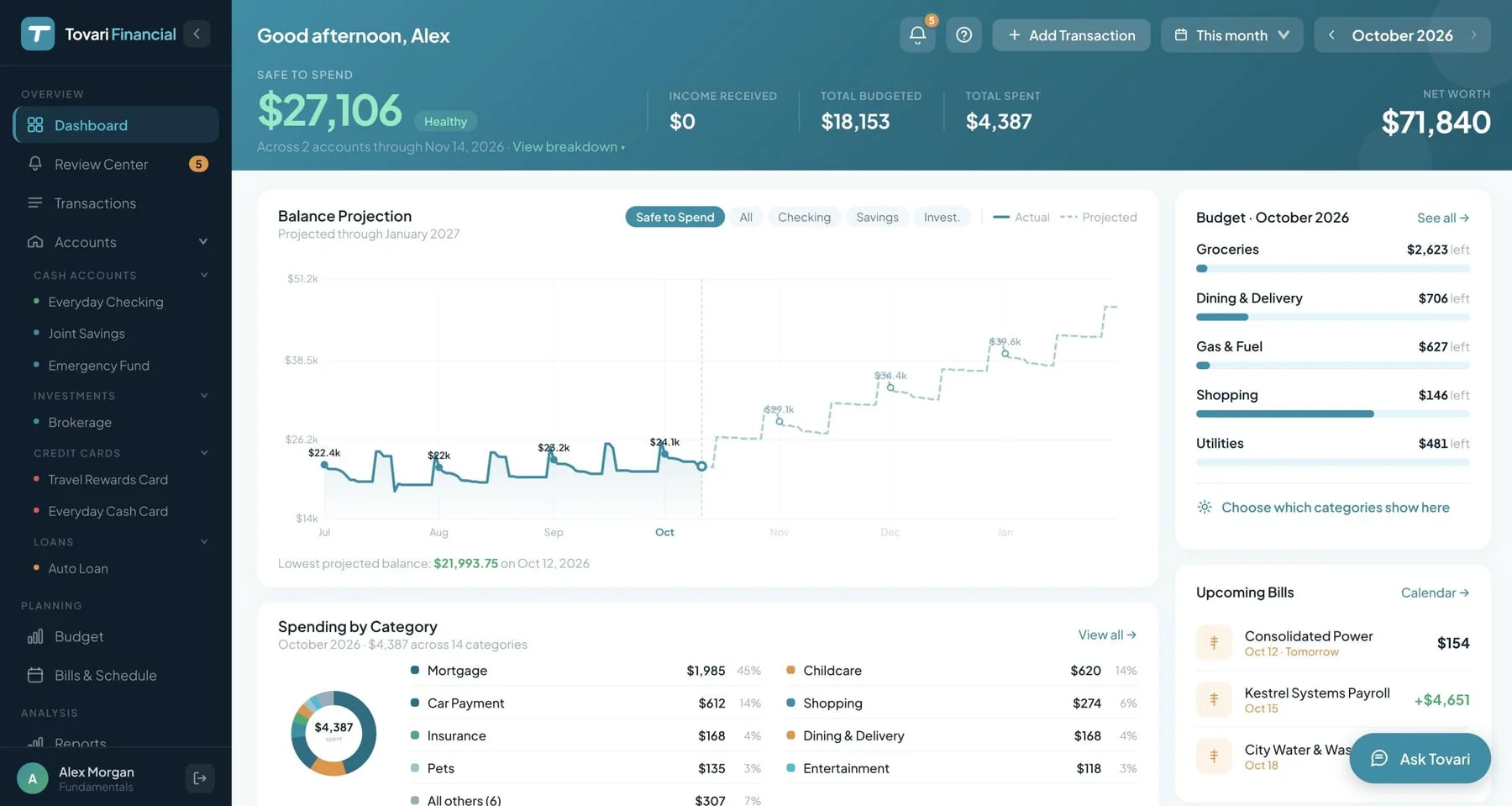
Section titled “The top of the screen”The header carries Safe to Spend with the end of your planning window, and four figures across from it: Income Received, Total Budgeted, Total Spent and Net Worth.
Net Worth is a point-in-time figure, so when you are looking at a period longer than a month it is labelled as being as of today — the others describe the period you picked.
That period is yours to choose: This month, Last month, Last 3 months, or a specific month. An Add Transaction control sits in the same row, next to the Review Center bell — which appears only when something is waiting for you there or you have notifications you have not read.
The cards
Section titled “The cards”The PC or Mac layout carries the fullest set:
- Balance projection — where your balance is heading across the coming weeks, given what is scheduled. It is the same projection as Bills Cash Flow, limited to your Safe to Spend accounts, so the lowest point and first negative day agree.
- Spending by category and Spending by payee — where the money in the chosen period went. The payee card’s legend groups payees by default category, so it can differ from the category card.
- Savings goals — progress against the goals you have set.
- Watched categories — the budget categories you have chosen to keep an eye on.
- Upcoming bills — what is due next.
- Account balances — every account at a glance.
Each card opens the screen behind it, so the dashboard stays a starting point rather than a place you work in.
On a phone browser
Section titled “On a phone browser”The phone-browser dashboard mirrors the Home tab of the mobile app, card for card. The title is Home, and your greeting opens the screen. The header carries Search, which opens every account’s transactions with the search field ready, and + for adding a transaction; both stay on screen as you scroll.
- The Safe to Spend band works as in the app: the figure and its state in words, the end of your planning window, the expected in, expected out and a day tiles, a red box and a shortfall line below zero, and Breakdown › for What’s behind the number — each included account’s balance, bills due and what is clear to spend. It collapses to a strip as you scroll.
- A month strip: Budgeted, Spent and Left.
- Your budget — up to five categories you watch, each with what is left (or how far over), and See all. Choose which categories show here adds, removes and reorders them, saving as you go. Until you have budgeted anything, a card offers to set that up.
- Balance projection — where your Safe to Spend balance is heading: drag across the chart to read any day; the strip beneath names the lowest point and any negative day. Tap either to open Bills.
- Favorites — up to four starred accounts, each opening its register, with All accounts. It appears once you star one.
- Coming up — the next three bills in your planning window, with their total. Swipe a row right for Enter and Skip, then tap one — a swipe alone never enters a bill. A bank-linked account offers no Enter. See the whole schedule opens Bills.
- Recent activity — your latest five transactions, each opening its register, and See all transactions.
Until you have an account, Home offers a card for connecting a bank or adding one by hand, and next steps. With no account in Safe to Spend, the band offers Pick the accounts you spend from. A figure that cannot load shows Try again, never a zero; offline, Home says so, keeps the last figures, and notes that adding a transaction needs a connection.
The bell at the top opens Alerts, where your notifications are, and carries a count when something is waiting.
The spending-by-category, spending-by-payee, savings-goals, watched-categories and account-balances cards are not in this layout. Use View desktop site in Settings, or open Tovari on a PC or Mac, to see them.
The Home tab
Section titled “The Home tab”The dashboard is the Home tab. Its header band leads with Safe to Spend: the figure, the state written out in words — never colour alone — the end of your planning window, and three tiles showing what is expected in, what is expected out, and roughly what that leaves per day.
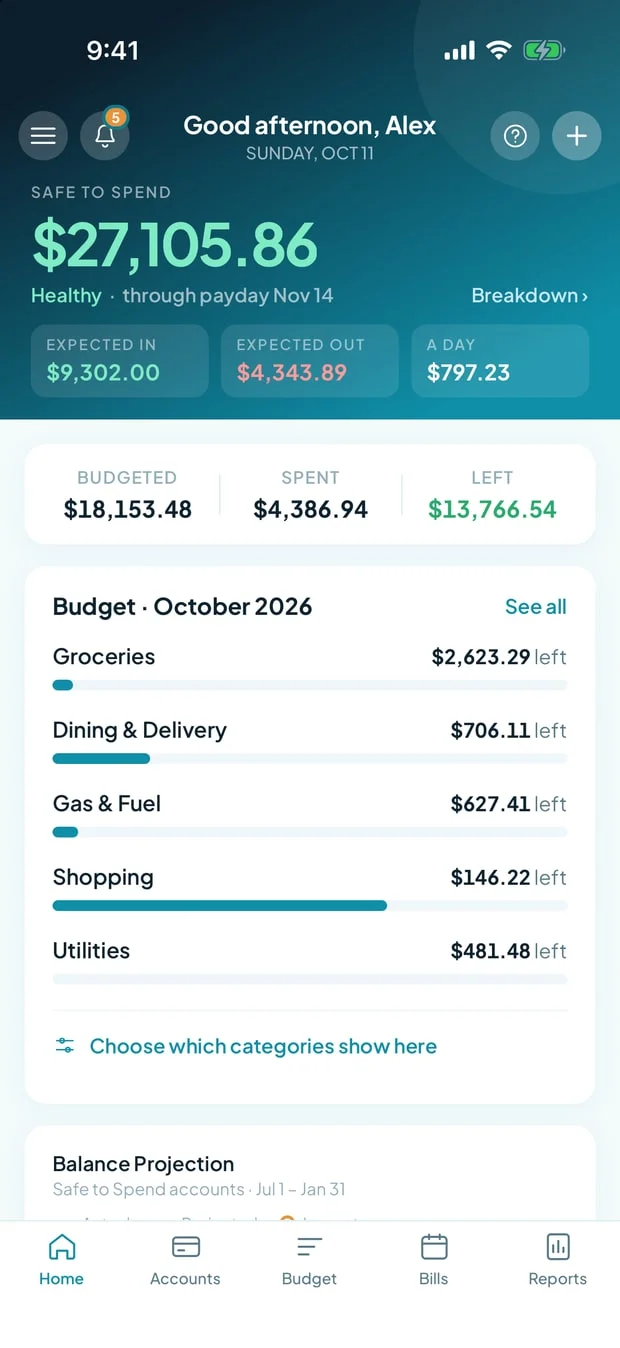
Breakdown on that band opens the account-by-account view. As you scroll, the band collapses to a compact strip that keeps the figure and the way into the breakdown on screen (or, when no account is included in Safe to Spend yet, the way into choosing one).
The header also carries the Alerts bell — shown when something is waiting for you in Alerts or you have notifications you have not read — Search, which opens the Transactions screen for every account with the search field ready to type into, and a control for adding a transaction from anywhere. Your greeting sits at the top of the cards below.
The cards
Section titled “The cards”Below the band, the Home tab shows:
- A month strip: Budgeted, Spent and Left.
- Your budget — the month’s categories, with a way through to the Budget screen. Until you have budgeted anything, a card offers to set that up instead.
- Balance projection — where your balance is heading, given what is scheduled, the same figures as Bills Cash Flow for those accounts. Tap the low point or the strip beneath the chart to jump straight to Bills.
- Favorite accounts — the accounts you have starred.
- Coming up — the bills due next. On iOS, swipe a row for Enter and Skip right from Home (in a phone browser the same swipe works on any phone).
- Recent activity — your latest transactions, each opening its account’s register, and See all transactions, which opens the Transactions screen for every account.
When you are new, or something is wrong
Section titled “When you are new, or something is wrong”Until you have an account connected, Home offers a card for connecting one and a short list of next steps, so an interrupted setup is easy to finish.
If you have accounts but none of them is included in Safe to Spend, the header asks you to Pick the accounts you spend from instead of showing a figure, and Choose accounts takes you to Accounts to include one.
If the app is offline it says so and keeps showing the last figures it has, marking them as not current; if a figure genuinely cannot be loaded you get a retry rather than a misleading zero.
What is not here
Section titled “What is not here”The spending-by-category, spending-by-payee, savings-goals, watched-categories and account-balances cards are part of the PC or Mac layout only. Reports in the mobile app cover some of that ground; the rest is on the web.
Related pages
Section titled “Related pages”- Safe to Spend — what the headline figure is built from.
- Accounts — the balances behind the account cards.
- Transactions — the activity every figure here is built on.
- Budget — your envelopes, and where the savings goals shown here are created.
- Getting set up — what happens before you first land here.
- What Tovari does — the overview, as part of the Quick start.
- Where each feature works — the platform map for every documented feature.