Safe to Spend
What is Safe to Spend?
Section titled “What is Safe to Spend?”Safe to Spend is how much you can spend right now without breaking something you have already committed to — what remains after Tovari has set aside the commitments falling between today and the end of your planning window.
It is not your bank balance, and it is not what is left in your budget.
Tovari works the number out and hands it to your screen. The apps display it; they never calculate it. That is why the dashboard, the breakdown and the mobile app always agree — there is one definition of the number, in one place.
What goes into Safe to Spend?
Section titled “What goes into Safe to Spend?”Safe to Spend is built from four things:
- The balances of the accounts you have included — your everyday spending accounts, as described in the next section.
- The commitments still to come between today and the end of the window: scheduled bills and one-off items on those accounts that have not been recorded yet.
- Income expected inside the window, so a paycheck landing on Friday counts toward what you can spend before it.
- Your budget, which shapes the guidance shown alongside the figure.
Tovari does not double-count. A bill you have already entered — or one your bank has already taken and reported — is money that has already moved, so it is not set aside a second time. The balance projections use the same rule (see Bills).
Your edits to one payment count. Change its amount or date in Bills Cash Flow and Safe to Spend follows: a date past your window moves it to the next one. Skip it and it is not set aside.
A Transfer bill is a special case: money moving between your own accounts is not a commitment in the everyday sense. If its Transfer to account is inside your Safe to Spend pool (or left unset), the payment does not reduce the figure — it is treated as an internal move. If the transfer’s destination is outside the pool — a savings account you keep excluded, a loan, a credit card, an investment account — it counts as an outflow like any other bill, because that money genuinely leaves what Safe to Spend is protecting.
Do not try to foot the number by hand. The pieces above are described so you can understand what moves it, not so you can reproduce it: which commitments fall inside your window, and which ones are already covered, is exactly the work Tovari is doing for you.
Which accounts count
Section titled “Which accounts count”| Account type | Counts toward Safe to Spend? |
|---|---|
| Checking | Yes, by default — you can turn it off |
| Savings | No, by default — you can turn it on |
| Investment | Never |
| Credit card | Never |
| Loan | Never |
Only checking and savings accounts can ever be part of the pool. Investment accounts, credit cards and loans can never be included — that is by design, not a setting anyone can find. A credit line is money you would owe rather than money you have, and an investment balance is not money you can spend this afternoon. Counting either would make the number a comfortable lie.
New accounts follow the defaults above: create a checking account and it joins the pool immediately; create a savings account and it stays out until you say otherwise.
Closing an account takes it out of the pool. Archiving an old checking account changes the number without you having to switch anything off first.
The two things you can change
Section titled “The two things you can change”Neither of these invents money. One moves the horizon; the other moves the warning line.
- Planning window — how far ahead the number looks, expressed as 1, 2 or 3 upcoming paychecks. Two is the default. A longer window sets aside more of what is coming, so the figure is smaller and steadier; a shorter one is more immediate and moves around more.
- Cushion — the point at which Tovari starts warning you that things are getting tight. Automatic derives it from your own typical spending; Fixed amount lets you name a figure. The cushion changes the warning only, never the number.
An Automatic cushion is built from the last three full months of your spending, and that spending still includes any move between your own accounts that Tovari has detected but you have not yet confirmed. When some of those are waiting, the dashboard, the breakdown (under your typical spending) and the Safe to Spend report show a notice saying how many possible transfers there are and how much may be counted in the spending your cushion is based on, with a Review link to the transfers queue in the Review Center. Nothing is subtracted for you: confirming a transfer there stops it counting, and the cushion updates. The notice does not appear with a Fixed amount cushion, or before you have any spending history.
If you have no scheduled income yet, there are no paychecks to count, so Tovari falls back to the end of the current month and tells you it has done so. Scheduling your pay as a recurring income item is what turns the window on.
Why did my Safe to Spend change?
Section titled “Why did my Safe to Spend change?”Safe to Spend is a live figure, so it changes as your money does. The usual reasons:
- a bill’s due date passed into or out of your window;
- a paycheck arrived, or its next date moved;
- you entered, edited or deleted a transaction on an included account;
- your bank imported activity on an included account;
- you included or excluded an account, or closed one;
- you changed the planning window.
The breakdown is the place to look: it shows the figure account by account, so you can see which account is carrying the commitments.
Where you see it
Section titled “Where you see it”The number leads the dashboard, under the heading Safe to Spend, with the end of your planning window shown beside it. Reports also carries a Safe to Spend tab.
The breakdown
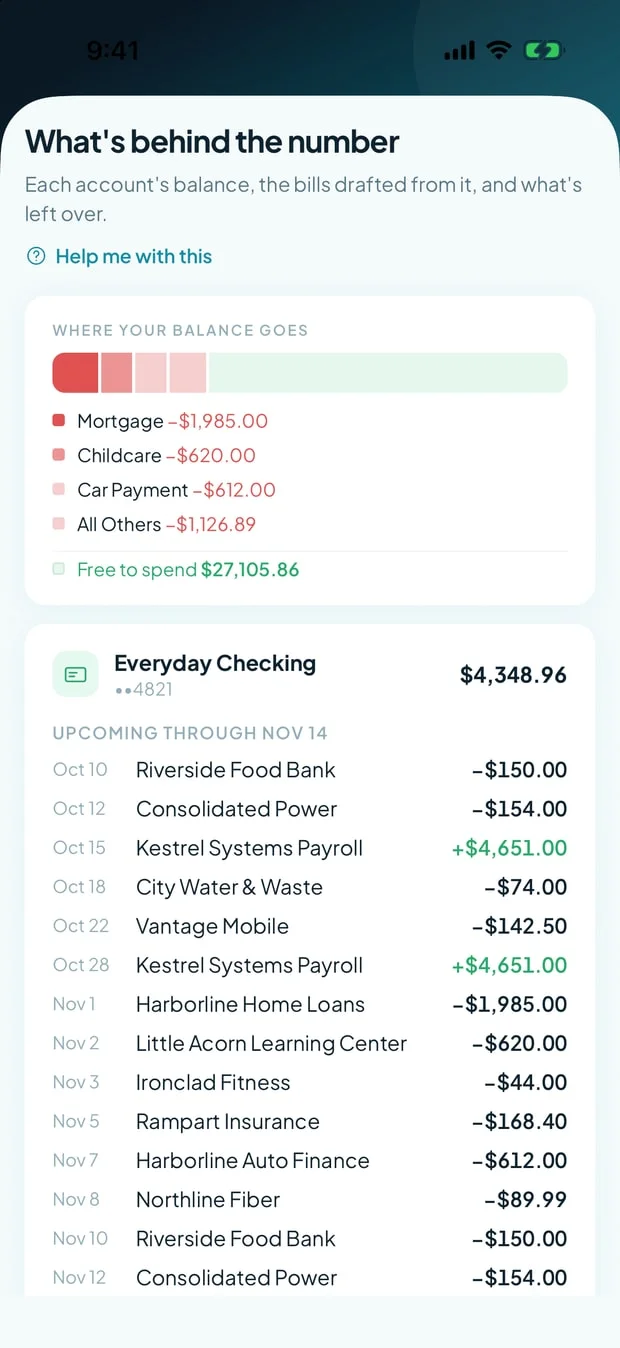
Section titled “The breakdown”Opening the breakdown shows, for each included account, its Balance, the Bills Due against it in the window, and what is Clear to Spend there — plus your typical spending, your budget envelopes, and the total. It is the fastest way to see why the headline is what it is.
Including or excluding an account
Section titled “Including or excluding an account”The switch is Include in Safe to Spend, in the account editor. It appears only on checking and savings accounts — there is nothing to switch on the other three types, so no switch is drawn.
Changing the window and the cushion
Section titled “Changing the window and the cushion”- Open Settings.
- Choose Safe to Spend.
- Pick 1, 2 or 3 paychecks for the planning window, and choose Automatic or Fixed amount for the cushion.
The section previews what your choice does before you commit it, and tells you if someone else in your household changed the same settings while you had the page open.
On a phone browser
Section titled “On a phone browser”The number leads the Home screen’s header band, the way it does in the mobile app: the figure, the state in words, the end of your planning window, and tiles for what is expected in, what is expected out, and roughly what that leaves per day. Breakdown › opens What’s behind the number as a sheet — a bar showing where your balance goes, then each included account with its balance, the bills due against it and what is clear to spend there, then the total. Your typical spending and your budget envelopes are not part of the phone breakdown; they are on the PC or Mac layout.
The Include in Safe to Spend switch is in the account’s Edit account sheet, on checking and savings accounts, as in the mobile app; the change is saved when you tap Save. The window and cushion controls are in Settings: open its Safe to Spend section.
Where you see it
Section titled “Where you see it”Safe to Spend is the figure at the top of the Home tab, with the state in words beneath it — never colour alone — the end of your planning window, and tiles for what is expected in, what is expected out, and roughly what that leaves per day.
The breakdown
Section titled “The breakdown”Breakdown on the Home band opens the account-by-account view: each included account with its balance, what is due against it, and what is clear to spend there.
Changing the window and the cushion
Section titled “Changing the window and the cushion”- Open the app menu from the screen header.
- Choose Settings.
- Expand the Safe to Spend section.
The controls are the same pair as the web — a 1 / 2 / 3 paycheck window and an automatic or fixed cushion — with a preview of the effect. The window control stays disabled, with an explanation and a way to add one, until you have a scheduled paycheck for it to count.
Changing which accounts count
Section titled “Changing which accounts count”When you create an account here, its inclusion follows the type you chose — checking joins the pool, everything else does not. To change it afterwards, open the account’s Edit account sheet, flip Include in Safe to Spend (checking and savings only), and tap Save changes. Everything else about Safe to Spend behaves identically.
Related pages
Section titled “Related pages”- Accounts — account types, and what closing one does.
- Dashboard — where the number is shown, alongside everything else.
- Transactions — the register activity that moves it.
- Understanding Safe to Spend — the short version, as part of the Quick start.
- Scheduling a bill — how commitments and paychecks get into the window.
- Where each feature works — the platform map for every documented feature.