Understanding Safe to Spend
Step 9 — the last page of the Quick start. Safe to Spend is the money you can spend without breaking a commitment you have already made. Tovari starts from the balances of your everyday spending accounts, sets aside what is already committed between today and the end of your planning window, and accounts for income arriving in that window.
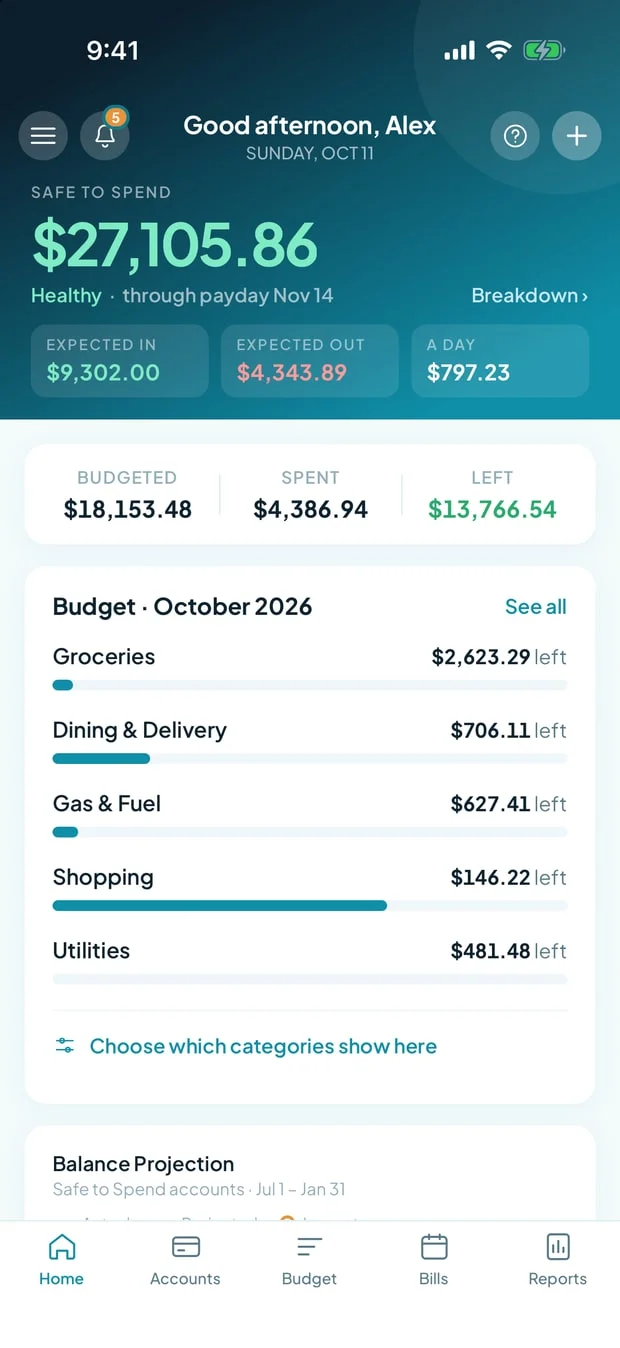
Where is Safe to Spend worked out?
Section titled “Where is Safe to Spend worked out?”On the server, in full, every time you look at it. The apps display it; they never work it out. That is deliberate: it depends on your accounts, your outstanding bill occurrences, your entered transactions, and your budget, and there is exactly one definition of it so the dashboard and the rest of the app can never disagree.
Which accounts count toward Safe to Spend?
Section titled “Which accounts count toward Safe to Spend?”Only checking and savings accounts are ever eligible:
| Account type | In the pool? |
|---|---|
| Checking | Yes by default — you can turn it off |
| Savings | No by default — you can turn it on |
| Investment | Never |
| Credit card | Never |
| Loan | Never |
Investment accounts, credit cards, and loans can never be included — that is by design, not a setting anyone can find. A credit line is money you would owe, not money you have.
New accounts follow the defaults above: create a checking account and it joins the pool straight away; create a savings account and it does not until you say so.
Closed accounts drop out. Closing an account removes it from the pool, so archiving an old checking account changes the number without you having to remember to untick anything.
What can I change about Safe to Spend?
Section titled “What can I change about Safe to Spend?”Two things. Neither invents money; they change the horizon and the warning line.
- Planning window — how many upcoming paychecks the number looks ahead: 1, 2, or 3. Two is the default. A longer window sets aside more upcoming commitments, so the number is smaller and steadier; a shorter one is more immediate.
- Cushion — the point at which the number starts warning you that things are getting tight. Automatic derives it from your own typical spending; Fixed amount lets you name a figure. The cushion changes only the warning, never the number itself.
If you have no scheduled income yet, Tovari cannot count paychecks, so it falls back to the end of the current month and tells you it has done so. Adding a scheduled paycheck (as a recurring income item — see scheduling a bill) is what turns the window on.
Include or exclude one account
Section titled “Include or exclude one account”The switch is Include in Safe to Spend, labelled Count this account’s balance toward your disposable-cash number. It appears in the account editor — both the Accounts screen’s detail panel and the register’s account dialog — and only on checking and savings accounts. There is nothing to toggle on the other three types, so no switch is drawn.
Change the window and the cushion
Section titled “Change the window and the cushion”- Open Settings.
- Choose Safe to Spend in the left rail — it sits between Household and Billing.
- Pick 1, 2, or 3 paychecks for the planning window, and choose Automatic or Fixed amount for the cushion.
The section previews what your choice does before you commit it, and warns you if someone else in your household changed the same settings while you had the page open.
Reading it
Section titled “Reading it”Safe to Spend has its own tab on Reports as well as the dashboard headline, with the account-by-account breakdown behind it.
The inclusion rules are identical — checking in by default, savings out by default, and investment, credit card, and loan accounts never eligible whatever you do.
Where the settings live
Section titled “Where the settings live”- Tap the Menu control in the screen header.
- Choose Settings.
- Expand the Safe to Spend accordion section. (The other sections are Household and Billing; each opens in place rather than pushing a new screen.)
The card there is the same pair of controls as the web: a 1 / 2 / 3 paycheck window and the automatic-or-fixed cushion, with a preview of the effect and the same “someone else changed this” resolution band. The window control is disabled — with an explanation and a way to add one — until you have a scheduled paycheck for it to count.
Changing which accounts count
Section titled “Changing which accounts count”The Edit account sheet carries an Include in Safe to Spend switch on checking and savings accounts, with the same label as the web — Count this account’s balance toward your disposable-cash number. Credit card, loan and investment accounts still don’t offer it: there is nothing to toggle on those types. Everything else about Safe to Spend behaves identically.
That is the Quick start
Section titled “That is the Quick start”You have an account, a bank connection, a categorized register, a budget envelope, a scheduled bill, and a Safe to Spend number that accounts for all of it. To go deeper, read Transactions for the register in full — what each status means, how a bank transaction settles, and how to reconcile against a statement — and Safe to Spend for the whole of the number you just met.